# Columns Displaying Incorrectly in Browser
**URL:** https://forum.pinegrow.com/t/columns-displaying-incorrectly-in-browser/5614
**Category:** Bug Reports
**Created:** [September 3, 2021, 3:00pm UTC](https://forum.pinegrow.com/t/columns-displaying-incorrectly-in-browser/5614 "2021-09-03T15:00:33Z")
**Posts on this page:** 11
**Page:** 2
### Author:  [@elizad21](https://forum.pinegrow.com/u/elizad21)
#### Post date: [September 6, 2021, 10:30pm UTC](https://forum.pinegrow.com/t/columns-displaying-incorrectly-in-browser/5614/21 "2021-09-06T22:30:47Z")
Oh ok! Thanks for the explanation. I’m just having to rebuild the section. I do have a question. Before, I had been able to make the top section full width. Now I can’t figure out how I did that. How do I make a full width section (instead of it being contained)?
And do you guys have any sort of actual instructions/knowledge base? I’ve been searching for things in the forum and I can’t find answers to a lot of my questions. Thank you.
---
### Author:  [@elizad21](https://forum.pinegrow.com/u/elizad21)
#### Post date: [September 6, 2021, 10:44pm UTC](https://forum.pinegrow.com/t/columns-displaying-incorrectly-in-browser/5614/22 "2021-09-06T22:44:32Z")
To clarify on my previous response, I want my top section to mimic this page: [https://stripe.com/](https://stripe.com/)
I want my image to be able to be flush with the right side of the page. In other programs, I’ve been able to make the page full width (edge to edge), and then I can work with the columns/padding/margins from there. How can I achieve this with Pinegrow? Thank you.
---
### Author:  [@elizad21](https://forum.pinegrow.com/u/elizad21)
#### Post date: [September 6, 2021, 10:53pm UTC](https://forum.pinegrow.com/t/columns-displaying-incorrectly-in-browser/5614/23 "2021-09-06T22:53:15Z")
Now another problem - I’m trying to get the column content to align in the middle, not at the top. As you can see in the screenshot, I have selected Vertical Align \> Middle. Yet the content does not move to the middle.

Honestly starting to get really frustrated. I’ve spent more time trying to get this program to work than actually designing.
---
### Author:  [@elizad21](https://forum.pinegrow.com/u/elizad21)
#### Post date: [September 6, 2021, 11:52pm UTC](https://forum.pinegrow.com/t/columns-displaying-incorrectly-in-browser/5614/24 "2021-09-06T23:52:25Z")
Another fun glitch. I accidentally deleted the wrong section. Went to Undo, but the section won’t come back. All of the other functions that I did will undo, but not deleting a section. This has happened twice now - after deleting a section, “Undo” won’t bring it back…So that section is lost forever, along with the work done on it.
If this program is going to be this difficult to use, I’m honestly going to have to just throw in the towel now. I don’t have time for this.
---
### Author:  [@elizad21](https://forum.pinegrow.com/u/elizad21)
#### Post date: [September 7, 2021, 12:21am UTC](https://forum.pinegrow.com/t/columns-displaying-incorrectly-in-browser/5614/25 "2021-09-07T00:21:02Z")
Oh interesting! Now when I preview the project in my browser, that section that I deleted and tried to undo is there. But it’s not visible in Pinegrow. And when I go into the code, that section is there, but it’s not visible in Pinegrow…
---
### Author:  [@elizad21](https://forum.pinegrow.com/u/elizad21)
#### Post date: [September 7, 2021, 12:25am UTC](https://forum.pinegrow.com/t/columns-displaying-incorrectly-in-browser/5614/26 "2021-09-07T00:25:58Z")
Just tried to delete the section out of the code, but then it said “The code has syntax errors”. I undid the code deletion, and it’s still saying that warning…
---
### Author:  [@TechAkayy](https://forum.pinegrow.com/u/TechAkayy)
#### Post date: [September 7, 2021, 1:31am UTC](https://forum.pinegrow.com/t/columns-displaying-incorrectly-in-browser/5614/27 "2021-09-07T01:31:22Z")
Hi @elizad21, welcome to Pinegrow.
> [@elizad21](#):
>
> Before, I had been able to make the top section full width. Now I can’t figure out how I did that. How do I make a full width section (instead of it being contained)?
As you are constantly changing your page at your end, and the community can’t access it, it’s going to be hard to troubleshoot as to why the layout is not getting rendered as per your expectation.
> [@elizad21](#):
>
> And do you guys have any sort of actual instructions/knowledge base?
Pinegrow let’s your build your page visually and help you easily upskill on the underlying frameworks like Bootstrap. But, in terms of how really these framework elements & classes work is a Bootstrap docs thingy.
For example, each of these visual helpers are covered here in the frameworks documentation here - [Flex · Bootstrap v5.1](https://getbootstrap.com/docs/5.1/utilities/flex/)
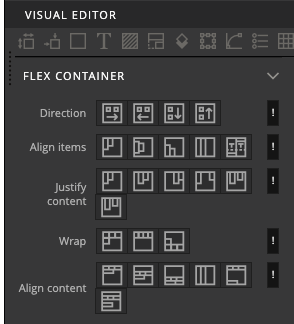
We have all experienced your current situation, layout not getting aligned or stretching as expected, the real solution is in fact the correct usage of the layout, spacing & alignment elements/classes.
> [@elizad21](#):
>
> I’ve spent more time trying to get this program to work than actually designing.
Sometimes, it’s worth taking a day break, pick a bootstrap course (I use Udemy) and learn the framework in detail, this has always helped me. Also, referring to official docs are always a must until you get familiar with it.
> [@elizad21](#):
>
> On Pinegrow it all displays correctly; in the browser, the image is pushed to the second row. There is clearly a glitch happening.
This is quite unlikely unless you the page in Pinegrow page view & external browser are in different page sizes (or) your external browser is non-chrome. Are you using safari or IE as your external browser?
> [@elizad21](#):
>
> I have selected Vertical Align \> Middle.
In the bootstrap docs here [Columns · Bootstrap v5.1](https://getbootstrap.com/docs/5.1/layout/columns/#vertical-alignment), you can notice that to vertical align a column within a row, the alignment has to be set on the container of the column which is the row. Remember the column will take the full size of the row, so your might have to set a height for your row to see your column center align vertically.
> [@elizad21](#):
>
> This has happened twice now - after deleting a section, “Undo” won’t bring it back…
Haven’t really experienced this sort of bug, are you able to share a video of this, would help the Pinegrow team a lot to fix (if in fact it’s a bug).
Also, note that backups of your page are stored under “\_pgbackup” folder at your root, where you can see older versions of your page. Check your settings to confirm you have this enabled, generally it’s enabled by default.
> [@elizad21](#):
>
> Just tried to delete the section out of the code, but then it said “The code has syntax errors”. I undid the code deletion, and it’s still saying that warning…
Again, hard to see what’s wrong here. It would be really helpful if you can push your project on github, push changes on a branch and tag your questions against them, so that we can pull your project in Pinegrow at our end, and follow your questions and assist in troubleshooting your design challenges!
---
### Author:  [@RobM](https://forum.pinegrow.com/u/RobM)
#### Post date: [September 7, 2021, 9:26am UTC](https://forum.pinegrow.com/t/columns-displaying-incorrectly-in-browser/5614/28 "2021-09-07T09:26:03Z")
Hi @elizad21,
Just to clarify add one thing to what @TechAkayy said. Pinegrow documentation can be found of the [home page](https://pinegrow.com/support), or by clicking on the help dialog in the upper-right – it is the icon with the question mark.
To reiterates what @TechAkayy said, it sounds like a lot of difficulties you are having is with how Bootstrap functions. Pinegrow is a low-code tool, but the functionalities it gives you help out the most when you know some basics of HTML, CSS, and the framework you are using. Here is the [Bootstrap 5 documentation.](https://getbootstrap.com/docs/5.0/layout/breakpoints/)
Cheers,
Bob
---
### Author:  [@elizad21](https://forum.pinegrow.com/u/elizad21)
#### Post date: [September 8, 2021, 7:45pm UTC](https://forum.pinegrow.com/t/columns-displaying-incorrectly-in-browser/5614/29 "2021-09-08T19:45:24Z")
Yeah, this tool isn’t going to be for me I don’t think. I understand what you are saying, but the program is clearly buggy. I mean, it should at least do the functions that it is claiming to do. Attached, I am clearly aligning the items center. However, they will not align. I’m not interested in having to upload code and walk through this back and forth multiple times for very simple actions, I just don’t have time to mess around with this; I’m on a deadline. Thanks for your help, but I don’t think this is going to work out…

---
### Author:  [@RobM](https://forum.pinegrow.com/u/RobM)
#### Post date: [September 8, 2021, 7:54pm UTC](https://forum.pinegrow.com/t/columns-displaying-incorrectly-in-browser/5614/30 "2021-09-08T19:54:50Z")
Hi @elizad21,
Sorry to hear of your experience with Pinegrow. Like all great tools, there is a learning curve. Perhaps one day you’ll have the time to try again.
Cheers,
Bob
---
### Author:  [@Rob](https://forum.pinegrow.com/u/Rob)
#### Post date: [September 9, 2021, 4:39pm UTC](https://forum.pinegrow.com/t/columns-displaying-incorrectly-in-browser/5614/31 "2021-09-09T16:39:02Z")
@elizad21 Hi. I just tried to quickly create what you’re doing with default content and it seems to work fine (screenshots attached). I clicked on the Properties panel then scrolled to Flex Container section and activated Flex and then selected “Center” in Align items. I hope this helps.

* * *

* * *

[Previous page](https://forum.pinegrow.com/t/columns-displaying-incorrectly-in-browser/5614.md?page=1)