# Drag grid items on page in PG?
**URL:** https://forum.pinegrow.com/t/drag-grid-items-on-page-in-pg/8158
**Category:** Questions
**Created:** [June 18, 2023, 5:44pm UTC](https://forum.pinegrow.com/t/drag-grid-items-on-page-in-pg/8158 "2023-06-18T17:44:56Z")
**Posts on this page:** 10
**Page:** 1
### Author:  [@kat](https://forum.pinegrow.com/u/kat)
#### Post date: [June 18, 2023, 5:44pm UTC](https://forum.pinegrow.com/t/drag-grid-items-on-page-in-pg/8158/1 "2023-06-18T17:44:56Z")
Drag grid items on page in PG to get A tabs? Below doesn’t do it or I didn’t understand. Help please
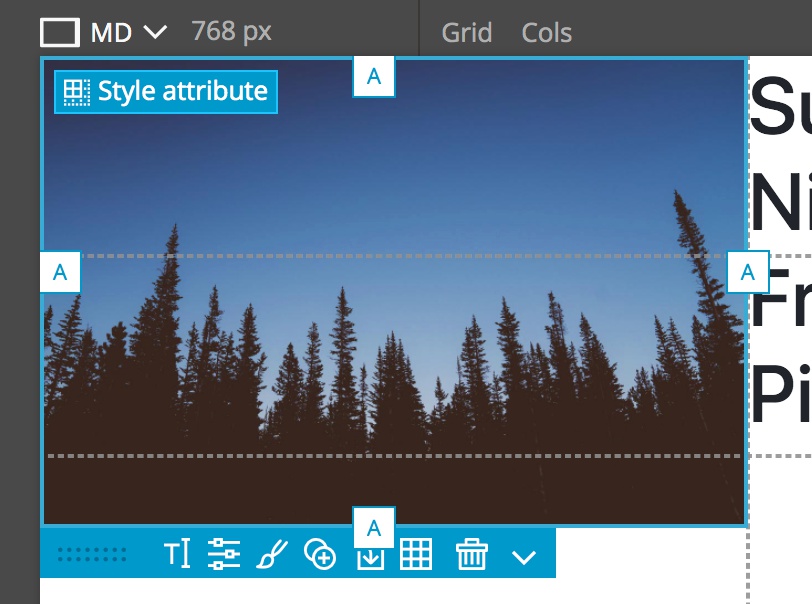
“Let’s start by placing the image. If you select the image in either the Tree panel or the Page View you can see that the edges now have tabs with the letter “A”, standing for automatic. This is because we haven’t added any CSS properties to define where it should be placed in the grid. We can also notice that the bottom of the image if floating between two areas. That is because the image is being constrained by the width of the column and then maintaining expanding to the full height of the image.”
---
### Author:  [@kat](https://forum.pinegrow.com/u/kat)
#### Post date: [June 19, 2023, 5:27pm UTC](https://forum.pinegrow.com/t/drag-grid-items-on-page-in-pg/8158/2 "2023-06-19T17:27:27Z")
Maybe it doesn’t show if you have grid properties? I think it is called style attributes. But nothing I’ve tried brings it up in PG. Well, back to VSC.
---
### Author:  [@adamslowe](https://forum.pinegrow.com/u/adamslowe)
#### Post date: [June 19, 2023, 5:30pm UTC](https://forum.pinegrow.com/t/drag-grid-items-on-page-in-pg/8158/3 "2023-06-19T17:30:39Z")
@kat Can you point me to the tutorial you are following? I know that Chrome did an update at some point that changed CSS Grid behavior and Pinegrow had to add an addendum to one of their tutorials, I just don’t remember which one off the top of my head.
Maybe @emmanuel can point us to the right place?
---
### Author:  [@kat](https://forum.pinegrow.com/u/kat)
#### Post date: [June 19, 2023, 8:36pm UTC](https://forum.pinegrow.com/t/drag-grid-items-on-page-in-pg/8158/4 "2023-06-19T20:36:03Z")
[https://www.udemy.com/course/learn-css-grid-with-pinegrow/learn/lecture/11841192#overview](https://www.udemy.com/course/learn-css-grid-with-pinegrow/learn/lecture/11841192#overview)
This is the time code so it’s in various previous spots.
Appreciate your help Adam.
---
### Author:  [@adamslowe](https://forum.pinegrow.com/u/adamslowe)
#### Post date: [June 19, 2023, 9:53pm UTC](https://forum.pinegrow.com/t/drag-grid-items-on-page-in-pg/8158/5 "2023-06-19T21:53:15Z")
Yup. It looks like they updated it on the website, but not Udemy. Here is the link to the updated tutorial.
> **[Positioning with named lines and improving the design - Updated | Pinegrow...](https://pinegrow.com/courses/learn-css-grid-with-pinegrow/positioning-with-named-lines-and-improving-the-design/)**
>
> We'll add a poster image to page header and position it with named lines. Then, we'll do some CSS styling to make the page more attractive. Make sure to watch the video update as well.
---
### Author:  [@kat](https://forum.pinegrow.com/u/kat)
#### Post date: [June 20, 2023, 1:53am UTC](https://forum.pinegrow.com/t/drag-grid-items-on-page-in-pg/8158/6 "2023-06-20T01:53:22Z")
I’ll watch the update tomorrow, Adam.
Has PG eliminated the “A tabs” that I can use to drag the size of grid cells to fit where elements go?
---
### Author:  [@adamslowe](https://forum.pinegrow.com/u/adamslowe)
#### Post date: [June 20, 2023, 2:26am UTC](https://forum.pinegrow.com/t/drag-grid-items-on-page-in-pg/8158/7 "2023-06-20T02:26:47Z")
The tabs are still there. I’ve been through that tutorial and it works as expected.
---
### Author:  [@kat](https://forum.pinegrow.com/u/kat)
#### Post date: [June 20, 2023, 2:44pm UTC](https://forum.pinegrow.com/t/drag-grid-items-on-page-in-pg/8158/8 "2023-06-20T14:44:05Z")
What do I need to click to get the “style Atribute” to show A tabs in PG?
I usually use VSC. But hoped that a few tricks in PG like A tabs that might be worth using PG more.

---
### Author:  [@adamslowe](https://forum.pinegrow.com/u/adamslowe)
#### Post date: [June 20, 2023, 3:26pm UTC](https://forum.pinegrow.com/t/drag-grid-items-on-page-in-pg/8158/9 "2023-06-20T15:26:07Z")
@kat Silly question, do you have the CSS Grid helpers showing? The screenshot below shows the track numbers since the element’s location has been defined, but the concept is the same.
If enabling that option doesn’t address the issue, you may want to zip your project folder up and send it to Pinegrow’s support email address ([support@pinegrow.com](mailto:support@pinegrow.com)) so they can troubleshoot it further.

---
### Author:  [@kat](https://forum.pinegrow.com/u/kat)
#### Post date: [June 20, 2023, 4:31pm UTC](https://forum.pinegrow.com/t/drag-grid-items-on-page-in-pg/8158/10 "2023-06-20T16:31:15Z")
Excellent Q, Adam. It did give me a chance to thing about display. But yes I do have grid showing.
PG and I have issues, still this was a good opportunity to get reacquainted.
Now back to checking grid code in VSC instead of hoping for shortcut ; )