# Quickly start Browser Sync with Shortcuts on Mac
**URL:** https://forum.pinegrow.com/t/quickly-start-browser-sync-with-shortcuts-on-mac/10968
**Category:** Tips & Tricks
**Created:** [July 28, 2025, 2:49am UTC](https://forum.pinegrow.com/t/quickly-start-browser-sync-with-shortcuts-on-mac/10968 "2025-07-28T02:49:09Z")
**Posts on this page:** 7
**Page:** 1
### Author:  [@PeteSharp](https://forum.pinegrow.com/u/PeteSharp)
#### Post date: [July 28, 2025, 2:49am UTC](https://forum.pinegrow.com/t/quickly-start-browser-sync-with-shortcuts-on-mac/10968/1 "2025-07-28T02:49:09Z")
Apple Shortcuts are so handy. I just use a simple one to start Browser Sync from the menu bar.
I thought I would post it here, as it may be useful for someone.
Just update the proxy IP to suit and make sure to tick “Pin in Menu Bar”

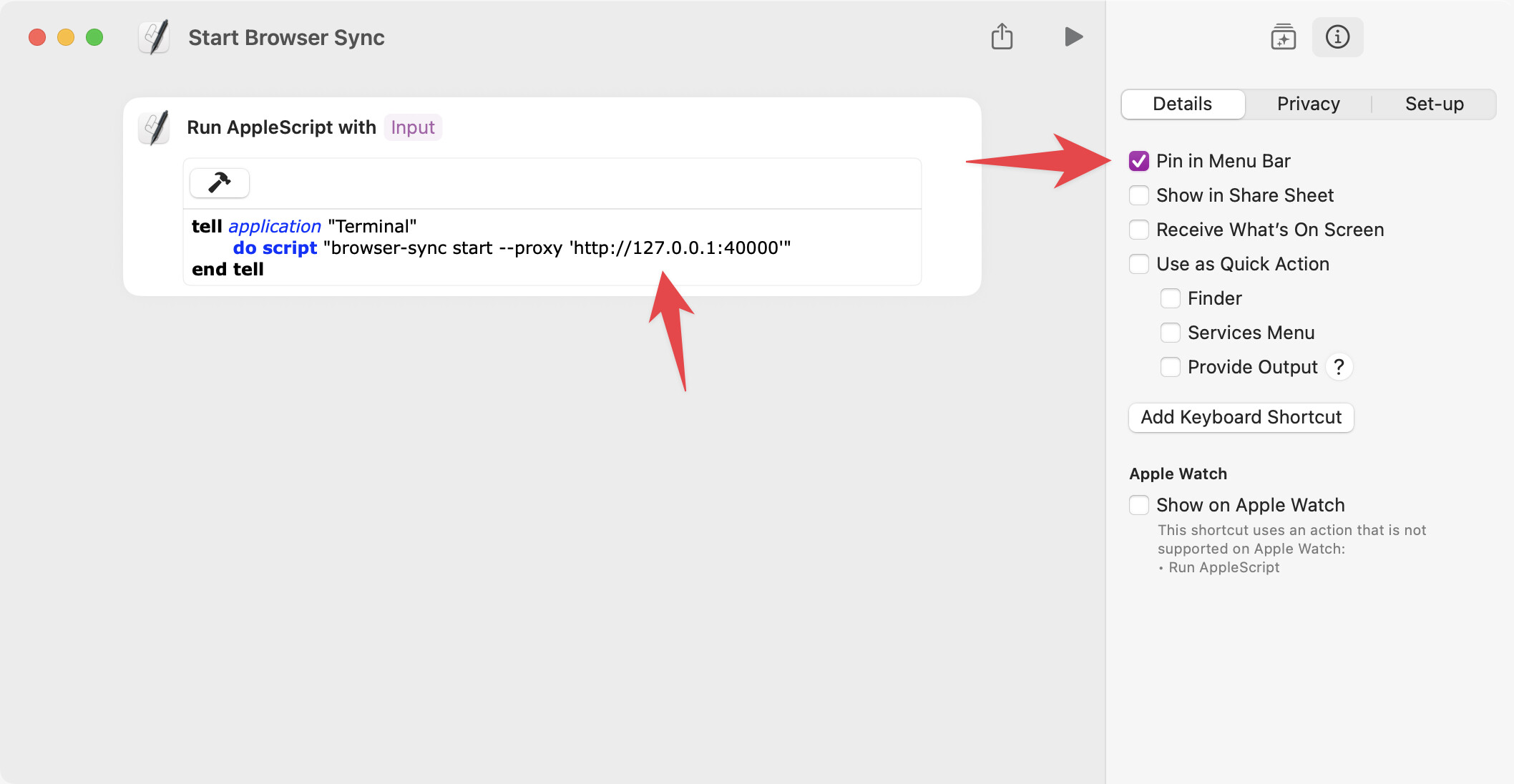
## Steps
1. Create a new shortcut
2. Add the Run AppleScript action
3. Copy Paste the code below (add your proxy IP)
4. Tick the pin to menu box under the details panel
```auto
tell application "Terminal"
do script "browser-sync start --proxy 'http://YOU-PROXY-IP'"
end tell
```
---
### Author:  [@reflex](https://forum.pinegrow.com/u/reflex)
#### Post date: [August 2, 2025, 11:51pm UTC](https://forum.pinegrow.com/t/quickly-start-browser-sync-with-shortcuts-on-mac/10968/3 "2025-08-02T23:51:52Z")
Without investigating this too much myself, wouldn’t another option be to just tell the webpage to refresh itself?
```swift
tell application "Safari"
tell front document to do JavaScript "window.location.reload()"
end tell
```
This would remove the need to have browser-sync running.
If browser-sync was better, you could also adapt @PeteSharp ‘s idea as follows…
Instead of adding the _Run AppleScript_ action, there is also a _Run Shell Script_ action. Then you could insert just the `browser-sync start --proxy '``http://YOU-PROXY-IP``'` bit in there.
---
### Author:  [@PeteSharp](https://forum.pinegrow.com/u/PeteSharp)
#### Post date: [August 4, 2025, 12:06am UTC](https://forum.pinegrow.com/t/quickly-start-browser-sync-with-shortcuts-on-mac/10968/4 "2025-08-04T00:06:53Z")
Hi @reflex, sure you can run a script to reload the page every time you want to reload it (but why? when you can cmd+r)… but this tip is about Browser Sync, where it automatically reloads on file change and works across a local network. Great workflow (well for me anyway).
My approach to the shortcut, creates a terminal window specifically just for Browser Sync to run in, handy if you have an existing terminal open.
---
### Author:  [@reflex](https://forum.pinegrow.com/u/reflex)
#### Post date: [August 4, 2025, 1:01am UTC](https://forum.pinegrow.com/t/quickly-start-browser-sync-with-shortcuts-on-mac/10968/5 "2025-08-04T01:01:00Z")
Ohhhh. Now I’m understanding. I thought your script was to tell browser-sync to do an update. Which I didn’t understand (since it’s supposed to do as you just said). I don’t use it myself.
So now I see that you were creating a script to launch the process, not refresh it. 🥸
---
### Author:  [@PeteSharp](https://forum.pinegrow.com/u/PeteSharp)
#### Post date: [August 4, 2025, 1:03am UTC](https://forum.pinegrow.com/t/quickly-start-browser-sync-with-shortcuts-on-mac/10968/6 "2025-08-04T01:03:39Z")
And here I was thinking “start browser sync” explained it 😆 😄
---
### Author:  [@reflex](https://forum.pinegrow.com/u/reflex)
#### Post date: [August 4, 2025, 3:57am UTC](https://forum.pinegrow.com/t/quickly-start-browser-sync-with-shortcuts-on-mac/10968/7 "2025-08-04T03:57:03Z")
Indeed – as in “tell the browser to sync”. 🤭
Anyhoo, the shell command shortcut might be useful, rather than calling AppleScript to run the shell command.
---
### Author:  [@PeteSharp](https://forum.pinegrow.com/u/PeteSharp)
#### Post date: [November 11, 2025, 12:16am UTC](https://forum.pinegrow.com/t/quickly-start-browser-sync-with-shortcuts-on-mac/10968/8 "2025-11-11T00:16:13Z")
> [@PeteSharp](#):
>
> make sure to tick “Pin in Menu Bar”
**UPDATE:**
With macOS Tahoe, this is no-longer the case, the menu bar is way more flexible. You can do it a couple of ways now.
- Menu Bar Control Center → Edit Controls
- System Prefs → Menu Bar → Add Controls → Shortcuts
In my case, I just have sync icon to run Browser Sync now. So it’s even easier than before. 😄
