# Tailwind DaisyUI defaulting to dark in Pinegrow
**URL:** https://forum.pinegrow.com/t/tailwind-daisyui-defaulting-to-dark-in-pinegrow/8588
**Category:** Third party Apps & plugins related to Pinegrow
**Tags:** css
**Created:** [December 19, 2023, 9:17pm UTC](https://forum.pinegrow.com/t/tailwind-daisyui-defaulting-to-dark-in-pinegrow/8588 "2023-12-19T21:17:27Z")
**Posts on this page:** 19
**Page:** 1
### Author:  [@kris](https://forum.pinegrow.com/u/kris)
#### Post date: [December 19, 2023, 9:17pm UTC](https://forum.pinegrow.com/t/tailwind-daisyui-defaulting-to-dark-in-pinegrow/8588/1 "2023-12-19T21:17:27Z")
I installed the DaisyUI plugin for Tailwind with the external compiler option. From a little testing, it seems to be working on my website just fine.
However, the Pinegrow editor defaults to DaisyUI’s dark theme. I’ve tried everything I can think of. Only thing that seems to work is if I set the `daisyui.styled = false` in tailwind.config.js, but that turns it off everywhere.
I should also note that I’m compiling tailwind.css into /tailwind\_theme. Additionally, I created a symlink to tailwind.css called tailwind\_for\_wp\_editor.css in that directory, which allows Pinegrow to display my DaisyUI class changes without reloading the page…
Only thing I haven’t tried was to set up a second external compiler process with a separate tailwind.config.js that sets `daisyui.styled = false` and compiles that to tailwind\_for\_wp\_editor.css…
All of that to say, I’d like to see the correct theme in Pinegrow. 🙂
Text color is the DaisyUI “dark” theme. I set `bg-white` on the master template, otherwise the background would be dark charcoal too:

---
### Author:  [@Plunky](https://forum.pinegrow.com/u/Plunky)
#### Post date: [December 20, 2023, 3:46am UTC](https://forum.pinegrow.com/t/tailwind-daisyui-defaulting-to-dark-in-pinegrow/8588/2 "2023-12-20T03:46:49Z")
> [@kris](#):
>
> However, the Pinegrow editor defaults to DaisyUI’s dark theme.
If I understand correctly you have included daisyUI in your project and now, in Pinegrow, you display the default daisy components on the dark theme. You would like to display the light theme in Pinegrow, right?
The [daisy documentation](https://daisyui.com/docs/themes/) says:
> [@DaisyUI Docs](#):
>
> _The_ **default theme is light (or dark for dark mode)** _but you can change the default theme from tailwind.config.js_
So the default theme is light for light mode and dark for dark mode.
The browser takes the theme preferences set on the operating system. If you are on Windows and have dark mode enabled among your system color settings, the browser will start in dark mode.
To view daisyUI’s light theme in Pinegrow, make sure your _system preferences \> colors_, are set to light theme.
> **Screenshots**
>
> 
> 
> 
> 
As an alternative, you can enable Chrome dev tools on by pressing F12, in the _Rendering_ tab there is an option to select your preferred _prefers-color-scheme_ value.
You can also simulate prefers-color-scheme in the Elements \> _Styles_ tab by clicking on the brush icon.


---
### Author:  [@TechAkayy](https://forum.pinegrow.com/u/TechAkayy)
#### Post date: [December 20, 2023, 4:21am UTC](https://forum.pinegrow.com/t/tailwind-daisyui-defaulting-to-dark-in-pinegrow/8588/3 "2023-12-20T04:21:23Z")
Here are my thoughts. Would be great if you can share your tailwind config file. If your project is publicly available somewhere on github, I can take a look into it.
When using external build process (are you using tailwind-cli or postcss-cli?), Pinegrow doesn’t interfere with the build process in anyway. It simply adds the classes (when using any tw visual controls) to the `_pginfo/used-classes.html & _pginfo/class.tracker.json`, so that they are captured in the JIT compile process.
So the best way to troubleshoot your situation is to close Pinegrow & open your html page in an external browser directly, and see if it’s behaving in a different way to how the page looks like within Pinegrow.
> [@kris](#):
>
> Pinegrow editor defaults to DaisyUI’s dark theme
I’m assuming you are not referring to Pinegrow interface’s theme that can be changed menu `Window > Theme > Light/Dark gray`. And that you are referring to the theme applied to your html page.
> [@kris](#):
>
> I should also note that I’m compiling tailwind.css into /tailwind\_theme. Additionally, I created a symlink to tailwind.css called tailwind\_for\_wp\_editor.css in that directory, which allows Pinegrow to display my DaisyUI class changes without reloading the page…
>
> Only thing I haven’t tried was to set up a second external compiler process with a separate tailwind.config.js that sets `daisyui.styled = false` and compiles that to tailwind\_for\_wp\_editor.css…
This is interesting what you are trying to achieve here. So, what happens when you don’t have the symlink file?
Here is a sample tailwind config from me end. You can see that in addition to extending the theme parameter, I’m also passing the primary & secondary from the design panel to daisyui too. Similarly, you can pass your colors to light & dark theme (following daisyui docs).
Is your `darkMode` set to `class`? And do you have `base: false` set like below in your daisyui config?
```auto
/* Pinegrow generated Design Panel Begin */
// pg_colors, pg_fonts, pg_backgrounds objects from Design Panel
/* Pinegrow generated Design Panel End */
export default {
darkMode: 'class',
plugins: [
require('@tailwindcss/typography'),
require('@tailwindcss/forms'),
],
daisyui: {
base: false,
themes: [
{
mytheme: {
primary: pg_colors.primary[500],
secondary: pg_colors.secondary[500],
},
light: {
primary: pg_colors.primary[500],
secondary: pg_colors.secondary[500],
},
dark: {
primary: pg_colors.primary[400],
secondary: pg_colors.secondary[400],
},
},
],
},
theme: {
extend: {
colors: {
...pg_colors,
},
// fontFamily: pg_fonts,
},
},
content: [
'./index.html',
'./src/**/*.{html,vue,svelte,astro,js,cjs,ts,cts,mts,jsx,tsx,md,mdx}',
'./_pginfo/**/*.{html,js}',
],
}
```
---
### Author:  [@kris](https://forum.pinegrow.com/u/kris)
#### Post date: [December 20, 2023, 5:43pm UTC](https://forum.pinegrow.com/t/tailwind-daisyui-defaulting-to-dark-in-pinegrow/8588/4 "2023-12-20T17:43:25Z")
I’m using Tailwind’s Node CLI. I followed the [directions in the documentation](https://pinegrow.com/docs/tailwind/using-external-build-process/). The documentation doesn’t mention `_pginfo/class.tracker.json`, interesting file.
Correct, the page looks different in the browser than in Pinegrow. The browser is correctly showing the DaisyUI theme, while Pinegrow is displaying the dark theme. Yes, I’m talking about CSS theme, NOT `Window > Theme > Light/Dark gray`.
One appreciable difference is your tailwind config sets base to false. That removes the automatic application of foreground and background colors.
If `base: true` In my case Pinegrow sets it to the dark theme, even if I apply `data-theme="light"` to the `` tag.

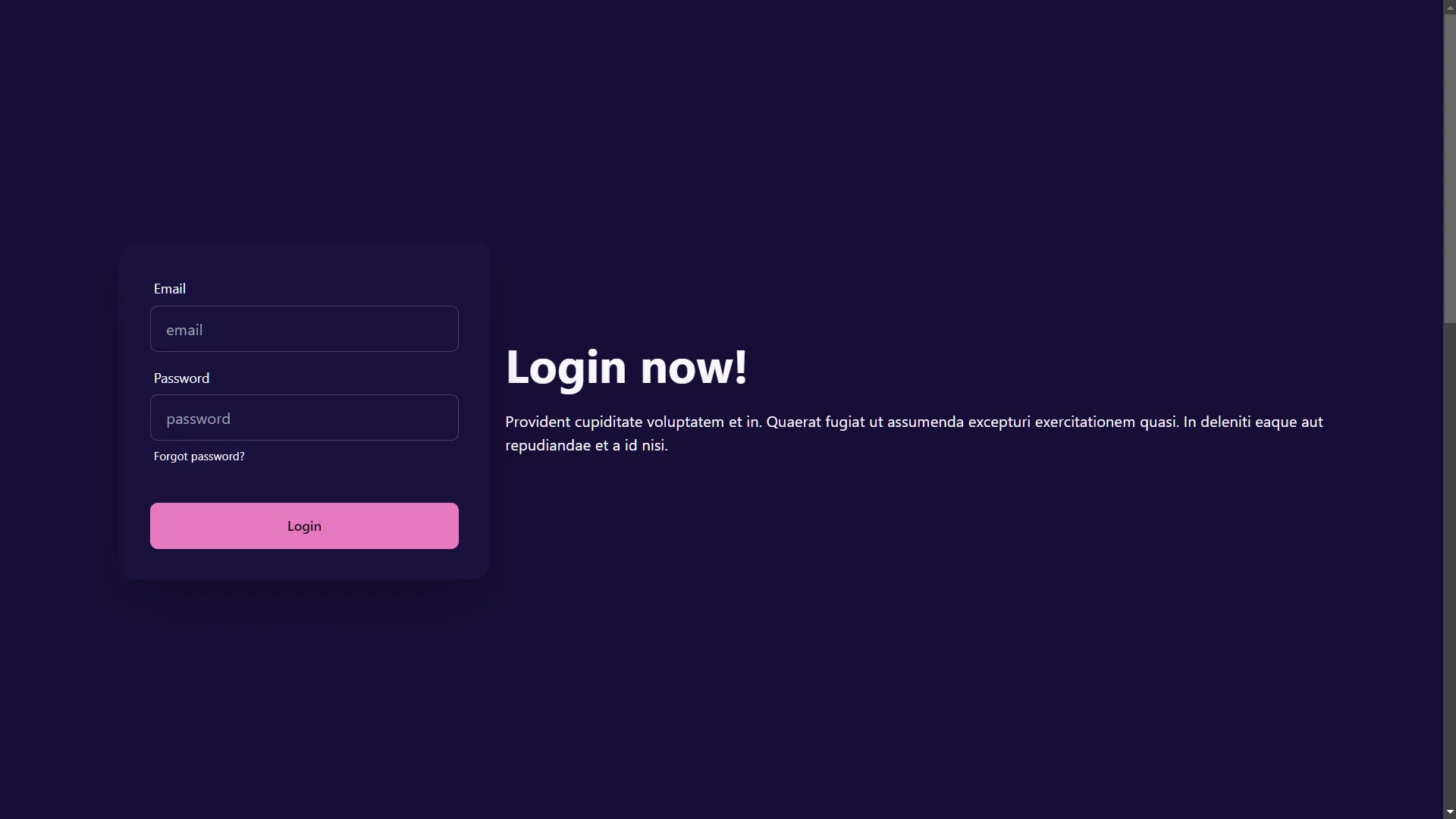
It displays correctly in the browser:

If I set `base: false` in tailwind config, Pinegrow renders this:

Changing `data-theme="synthwave"` and leaving `base:false`, Pinegrow renders it like this:

And the browser renders it like this… but I want the Synthwave purple background.

So I set `base: true`, and Pinegrow renders this:

And the browser renders this:

Here’s my tailwind.config.js:
```auto
/* Pinegrow generated Design Panel Begin */
const pg_colors = {
dustyBlue: {
'50': '#dce5ea',
'100': '#b7c5d2',
'200': '#92a6ba',
'300': '#6d89a3',
'400': '#476c8c',
'500': '#195176',
'600': '#164666',
'700': '#133b56',
'800': '#103046',
'900': '#0c2638',
'950': '#091c29',
},
red: {
'50': '#fef2f2',
'100': '#fee2e2',
'200': '#fecaca',
'300': '#fca5a5',
'400': '#f87171',
'500': '#ef4444',
'600': '#dc2626',
'700': '#b91c1c',
'800': '#991b1b',
'900': '#7f1d1d',
},
yellow: {
'50': '#fffbeb',
'100': '#fef3c7',
'200': '#fde68a',
'300': '#fcd34d',
'400': '#fbbf24',
'500': '#f59e0b',
'600': '#d97706',
'700': '#b45309',
'800': '#92400e',
'900': '#78350f',
},
green: {
'50': '#ecfdf5',
'100': '#d1fae5',
'200': '#a7f3d0',
'300': '#6ee7b7',
'400': '#34d399',
'500': '#10b981',
'600': '#059669',
'700': '#047857',
'800': '#065f46',
'900': '#064e3b',
},
blue: {
'50': '#eff6ff',
'100': '#dbeafe',
'200': '#bfdbfe',
'300': '#93c5fd',
'400': '#60a5fa',
'500': '#3b82f6',
'600': '#2563eb',
'700': '#1d4ed8',
'800': '#1e40af',
'900': '#1e3a8a',
},
indigo: {
'50': '#eef2ff',
'100': '#e0e7ff',
'200': '#c7d2fe',
'300': '#a5b4fc',
'400': '#818cf8',
'500': '#6366f1',
'600': '#4f46e5',
'700': '#4338ca',
'800': '#3730a3',
'900': '#312e81',
},
purple: {
'50': '#f5f3ff',
'100': '#ede9fe',
'200': '#ddd6fe',
'300': '#c4b5fd',
'400': '#a78bfa',
'500': '#8b5cf6',
'600': '#7c3aed',
'700': '#6d28d9',
'800': '#5b21b6',
'900': '#4c1d95',
},
pink: {
'50': '#fdf2f8',
'100': '#fce7f3',
'200': '#fbcfe8',
'300': '#f9a8d4',
'400': '#f472b6',
'500': '#ec4899',
'600': '#db2777',
'700': '#be185d',
'800': '#9d174d',
'900': '#831843',
},
gray: {
'50': '#e9eaec',
'100': '#ced1d5',
'200': '#b5b8bf',
'300': '#9ba0aa',
'400': '#838995',
'500': '#6b7280',
'600': '#595e6a',
'700': '#474b55',
'800': '#363940',
'900': '#25282d',
},
dust: {
'50': '#fcfcfd',
'100': '#f9f9fa',
'200': '#f5f5f7',
'300': '#f2f2f4',
'400': '#eeeef2',
'500': '#ebebef',
'600': '#cacace',
'700': '#ababad',
'800': '#8c8c8e',
'900': '#6e6e70',
'950': '#525254',
},
}
const pg_fonts = {sans: ["'Inter', sans-serif",
],
serif: ['"Times New Roman", Times, serif',
],
'Open Sans': ["'Open Sans', sans-serif",
],
}
const pg_backgrounds = {}
/* Pinegrow generated Design Panel End */
/** @type {import('tailwindcss').Config} */
//Unset default colors
delete pg_colors.gray;
delete pg_colors.red;
delete pg_colors.yellow;
delete pg_colors.green;
delete pg_colors.blue;
delete pg_colors.indigo;
delete pg_colors.purple
delete pg_colors.pink;
//done
module.exports = {
content: ["./*.{html,php,js}"],
daisyui: {
themes: ["light", "dark"], // false: only light + dark | true: all themes | array: specific themes like this ["light", "dark", "synthwave"]
darkTheme: "synthwave", // name of one of the included themes for dark mode
//darkMode: ["class", '[data-theme="light"]'],
base: true, // applies background color and foreground color for root element by default
styled: true, // include daisyUI colors and design decisions for all components
utils: true, // adds responsive and modifier utility classes
prefix: "", // prefix for daisyUI classnames (components, modifiers and responsive class names. Not colors)
logs: false, // Shows info about daisyUI version and used config in the console when building your CSS
themeRoot: ":root", // The element that receives theme color CSS variables
},
theme: {
extend: {
aspectRatio: {
'3/4': '3 / 4',
},
maxWidth: {
'1/2': '50%',
},
colors: pg_colors, //<-- Use the pg_colors for colors
fontFamily: pg_fonts, //<-- Use the pg_fonts for fonts
},
},
plugins: [
require('@tailwindcss/typography'),
require("daisyui")
],
}
```
---
### Author:  [@TechAkayy](https://forum.pinegrow.com/u/TechAkayy)
#### Post date: [December 20, 2023, 6:00pm UTC](https://forum.pinegrow.com/t/tailwind-daisyui-defaulting-to-dark-in-pinegrow/8588/5 "2023-12-20T18:00:10Z")
I would suggest opening Pinegrow devtools (shortcut key is Ctrl/Cmd + Shift + C), use the selector icon (top left corner of the devtools - left of Elements tab) and drop it into your page.

Now you could follow @Plunky’s suggestion to toggle the dark/light mode.

---
### Author:  [@kris](https://forum.pinegrow.com/u/kris)
#### Post date: [December 20, 2023, 6:27pm UTC](https://forum.pinegrow.com/t/tailwind-daisyui-defaulting-to-dark-in-pinegrow/8588/6 "2023-12-20T18:27:44Z")
Gotcha. Thanks @Plunky and @TechAkayy for showing me that setting in Dev Tools and that I can access Dev Tools in Pinegrow directly.
However, this still doesn’t allow Pinegrow to display the synthwave theme for me. I can only get it working with `light` and `dark` themes.
I have `data-theme="synthwave"` applied to the `` and `` tags. I am only importing one theme, “synthwave” and it’s also set `darkTheme: synthwave`.
But I’m just getting “light” or “dark” themes in Pinegrow…
---
### Author:  [@TechAkayy](https://forum.pinegrow.com/u/TechAkayy)
#### Post date: [December 20, 2023, 6:32pm UTC](https://forum.pinegrow.com/t/tailwind-daisyui-defaulting-to-dark-in-pinegrow/8588/7 "2023-12-20T18:32:55Z")
Does the synthwave theme work in an external browser?
I think this is a daisyui settings thingy. Try adding it to the themes array (that currently has light & dark)
---
### Author:  [@kris](https://forum.pinegrow.com/u/kris)
#### Post date: [December 20, 2023, 6:43pm UTC](https://forum.pinegrow.com/t/tailwind-daisyui-defaulting-to-dark-in-pinegrow/8588/8 "2023-12-20T18:43:56Z")
Yes, it works in the external browser. You can see the images I posted in a previous message.
DaisyUI wants `data-theme="synthwave"` set in the `` tag
```auto
...
daisyui: {
themes: ["synthwave"],
darkTheme: "synthwave",
base: true,
...
```
---
### Author:  [@kris](https://forum.pinegrow.com/u/kris)
#### Post date: [December 20, 2023, 8:59pm UTC](https://forum.pinegrow.com/t/tailwind-daisyui-defaulting-to-dark-in-pinegrow/8588/9 "2023-12-20T20:59:14Z")
Does Pinegrow support `oklch`? Looking in the generated css, it will overrides the selected theme if the browser doesn’t support `oklch`, with this: `@supports not (color: oklch(0 0 0))`. See below for a larger section of code. The themes are using RGB colors…
Looks like Chrome picked up [support for `oklch` in version 111](https://developer.mozilla.org/en-US/docs/Web/CSS/color_value/oklch). What version of Chrome/Chromium is Pinegrow using? [DaisyUI v4](https://github.com/saadeghi/daisyui/discussions/2507) dropped support for ‘old’ browsers.
I checked against both Chrome and FireFox. It looks like Pinegrow is defaulting to the first set of themes, and it’s not loading the themes lower down in tailwind.css.
FireFox and Chrome will both update the theme when I change `data-theme="light"` to `data-theme="synthwave"` in the `` tag.
```auto
@supports not (color: oklch(0 0 0)){
:root{
color-scheme: light;
--fallback-p: #491eff;
--fallback-pc: #d4dbff;
--fallback-s: #ff41c7;
--fallback-sc: #fff9fc;
--fallback-a: #00cfbd;
--fallback-ac: #00100d;
--fallback-n: #2b3440;
--fallback-nc: #d7dde4;
--fallback-b1: #ffffff;
--fallback-b2: #e5e6e6;
--fallback-b3: #e5e6e6;
--fallback-bc: #1f2937;
--fallback-in: #00b3f0;
--fallback-inc: #000000;
--fallback-su: #00ca92;
--fallback-suc: #000000;
--fallback-wa: #ffc22d;
--fallback-wac: #000000;
--fallback-er: #ff6f70;
--fallback-erc: #000000;
}
@media (prefers-color-scheme: dark){
:root{
color-scheme: dark;
--fallback-p: #7582ff;
--fallback-pc: #050617;
--fallback-s: #ff71cf;
--fallback-sc: #190211;
--fallback-a: #00c7b5;
--fallback-ac: #000e0c;
--fallback-n: #2a323c;
--fallback-nc: #a6adbb;
--fallback-b1: #1d232a;
--fallback-b2: #191e24;
--fallback-b3: #15191e;
--fallback-bc: #a6adbb;
--fallback-in: #00b3f0;
--fallback-inc: #000000;
--fallback-su: #00ca92;
--fallback-suc: #000000;
--fallback-wa: #ffc22d;
--fallback-wac: #000000;
--fallback-er: #ff6f70;
--fallback-erc: #000000;
}
}
}
html{
-webkit-tap-highlight-color: transparent;
}
:root{
color-scheme: light;
--in: 0.7206 0.191 231.6;
--su: 64.8% 0.150 160;
--wa: 0.8471 0.199 83.87;
--er: 0.7176 0.221 22.18;
--pc: 0.89824 0.06192 275.75;
--ac: 0.15352 0.0368 183.61;
--inc: 0 0 0;
--suc: 0 0 0;
--wac: 0 0 0;
--erc: 0 0 0;
--rounded-box: 1rem;
--rounded-btn: 0.5rem;
--rounded-badge: 1.9rem;
--animation-btn: 0.25s;
--animation-input: .2s;
--btn-focus-scale: 0.95;
--border-btn: 1px;
--tab-border: 1px;
--tab-radius: 0.5rem;
--p: 0.4912 0.3096 275.75;
--s: 0.6971 0.329 342.55;
--sc: 0.9871 0.0106 342.55;
--a: 0.7676 0.184 183.61;
--n: 0.321785 0.02476 255.701624;
--nc: 0.894994 0.011585 252.096176;
--b1: 1 0 0;
--b2: 0.961151 0 0;
--b3: 0.924169 0.00108 197.137559;
--bc: 0.278078 0.029596 256.847952;
}
@media (prefers-color-scheme: dark){
:root{
color-scheme: dark;
--b2: 0.202941 0.076211 287.835609;
--b3: 0.187665 0.070475 287.835609;
--pc: 0.144421 0.031903 342.009383;
--sc: 0.156543 0.02362 227.382405;
--ac: 0.17608 0.0412 93.72;
--rounded-box: 1rem;
--rounded-btn: 0.5rem;
--rounded-badge: 1.9rem;
--animation-btn: 0.25s;
--animation-input: .2s;
--btn-focus-scale: 0.95;
--border-btn: 1px;
--tab-border: 1px;
--tab-radius: 0.5rem;
--p: 0.722105 0.159514 342.009383;
--s: 0.782714 0.118101 227.382405;
--a: 0.8804 0.206 93.72;
--n: 0.255554 0.103537 286.507967;
--nc: 0.979365 0.00819 301.358346;
--b1: 0.218216 0.081948 287.835609;
--bc: 0.979365 0.00819 301.358346;
--in: 0.765197 0.12273 231.831603;
--inc: 0.235017 0.096418 290.329844;
--su: 0.860572 0.115038 178.624677;
--suc: 0.235017 0.096418 290.329844;
--wa: 0.85531 0.122117 93.722227;
--wac: 0.235017 0.096418 290.329844;
--er: 0.737005 0.121339 32.639257;
--erc: 0.235017 0.096418 290.329844;
}
}
[data-theme=light]{
color-scheme: light;
--in: 0.7206 0.191 231.6;
--su: 64.8% 0.150 160;
--wa: 0.8471 0.199 83.87;
--er: 0.7176 0.221 22.18;
--pc: 0.89824 0.06192 275.75;
--ac: 0.15352 0.0368 183.61;
--inc: 0 0 0;
--suc: 0 0 0;
--wac: 0 0 0;
--erc: 0 0 0;
--rounded-box: 1rem;
--rounded-btn: 0.5rem;
--rounded-badge: 1.9rem;
--animation-btn: 0.25s;
--animation-input: .2s;
--btn-focus-scale: 0.95;
--border-btn: 1px;
--tab-border: 1px;
--tab-radius: 0.5rem;
--p: 0.4912 0.3096 275.75;
--s: 0.6971 0.329 342.55;
--sc: 0.9871 0.0106 342.55;
--a: 0.7676 0.184 183.61;
--n: 0.321785 0.02476 255.701624;
--nc: 0.894994 0.011585 252.096176;
--b1: 1 0 0;
--b2: 0.961151 0 0;
--b3: 0.924169 0.00108 197.137559;
--bc: 0.278078 0.029596 256.847952;
}
[data-theme=synthwave]{
color-scheme: dark;
--b2: 0.202941 0.076211 287.835609;
--b3: 0.187665 0.070475 287.835609;
--pc: 0.144421 0.031903 342.009383;
--sc: 0.156543 0.02362 227.382405;
--ac: 0.17608 0.0412 93.72;
--rounded-box: 1rem;
--rounded-btn: 0.5rem;
--rounded-badge: 1.9rem;
--animation-btn: 0.25s;
--animation-input: .2s;
--btn-focus-scale: 0.95;
--border-btn: 1px;
--tab-border: 1px;
--tab-radius: 0.5rem;
--p: 0.722105 0.159514 342.009383;
--s: 0.782714 0.118101 227.382405;
--a: 0.8804 0.206 93.72;
--n: 0.255554 0.103537 286.507967;
--nc: 0.979365 0.00819 301.358346;
--b1: 0.218216 0.081948 287.835609;
--bc: 0.979365 0.00819 301.358346;
--in: 0.765197 0.12273 231.831603;
--inc: 0.235017 0.096418 290.329844;
--su: 0.860572 0.115038 178.624677;
--suc: 0.235017 0.096418 290.329844;
--wa: 0.85531 0.122117 93.722227;
--wac: 0.235017 0.096418 290.329844;
--er: 0.737005 0.121339 32.639257;
--erc: 0.235017 0.096418 290.329844;
}
```
---
### Author:  [@kris](https://forum.pinegrow.com/u/kris)
#### Post date: [December 20, 2023, 9:30pm UTC](https://forum.pinegrow.com/t/tailwind-daisyui-defaulting-to-dark-in-pinegrow/8588/10 "2023-12-20T21:30:46Z")
Rolled back to DaisyUI v3.9.4, and Pinegrow works as expected. It is able to load the themes correctly.
It looks like the problem is Pinegrow is using a version of Chrome/Chromium that doesn’t support `oklch`.
When do you expect to upgrade the Chrome/Chromium engine?
---
### Author:  [@Plunky](https://forum.pinegrow.com/u/Plunky)
#### Post date: [December 20, 2023, 9:34pm UTC](https://forum.pinegrow.com/t/tailwind-daisyui-defaulting-to-dark-in-pinegrow/8588/11 "2023-12-20T21:34:26Z")
> [@kris](#):
>
> ```auto
> module.exports = {
> content: ["./*.{html,php,js}"],
> daisyui: {
> themes: ["light", "dark"], // false: only light + dark | true: all themes | array: specific themes like this ["light", "dark", "synthwave"]
> darkTheme: "synthwave", // name of one of the included themes for dark mode
> //darkMode: ["class", '[data-theme="light"]'],
> base: true, // applies background color and foreground color for root element by default
> styled: true, // include daisyUI colors and design decisions for all components
> utils: true, // adds responsive and modifier utility classes
> prefix: "", // prefix for daisyUI classnames (components, modifiers and responsive class names. Not colors)
> logs: false, // Shows info about daisyUI version and used config in the console when building your CSS
> themeRoot: ":root", // The element that receives theme color CSS variables
> },
>
> ```
“_themes:_” encloses the color sets you want to include.

Check your tailwind.css file: are these included in it?
```auto
@tailwind base;
@tailwind components;
@tailwind utilities;
```
---
### Author:  [@kris](https://forum.pinegrow.com/u/kris)
#### Post date: [December 20, 2023, 9:43pm UTC](https://forum.pinegrow.com/t/tailwind-daisyui-defaulting-to-dark-in-pinegrow/8588/12 "2023-12-20T21:43:51Z")
@Plunky Good catch there, I must have copied that in wrong or between changes. I certainly imported it as you describe, with synthwave in the themes array.
Please see my previous two responses. The problem appears to be that Pinegrow’s version of Chrome doesn’t support `oklch`.
What version of DaisyUI are you using?
The following works correctly with `DaisyUI v3.9.4`, but not `daisyui@latest`… v4+
```auto
daisyui: {
themes: ["light", "synthwave"], // false: only light + dark | true: all themes | array: specific themes like this ["light", "dark", "cupcake"]
darkTheme: "synthwave", // name of
```
---
### Author:  [@Plunky](https://forum.pinegrow.com/u/Plunky)
#### Post date: [December 22, 2023, 3:39am UTC](https://forum.pinegrow.com/t/tailwind-daisyui-defaulting-to-dark-in-pinegrow/8588/13 "2023-12-22T03:39:28Z")
I gave it a try, following the Pinwgrow guides/following your configuration.
> **Links**
>
> [Using the external build process](https://pinegrow.com/docs/tailwind/using-external-build-process/)
> [The complete guide to customizing a Tailwind CSS theme](https://pinegrow.com/tutorials/customizing-a-tailwind-css-theme/)
I can run themes without problems, if your project is public send it here, maybe we can find a solution.
[ ](https://vimeo.com/897083288)
## package.json
```auto
"devDependencies": {
"autoprefixer": "^10.4.16",
"daisyui": "^4.4.23",
"postcss": "^8.4.32",
"postcss-cli": "^11.0.0",
"tailwindcss": "^3.4.0"
}
```
## tailwind.config.js
### module.exports =
```auto
module.exports = {
content: ["./*.{html,js,php}"],
theme: {
extend: {
colors: {
blued: {
100: "#72c1df",
200: "#5bb7d9",
300: "#43add4",
400: "#2ca2ce",
500: "#1498c9",
600: "#1289b5",
700: "#107aa1",
800: "#0e6a8d",
900: "#0c5b79",
},
},
},
},
plugins: [require("daisyui")],
daisyui: {
themes: [
"synthwave",
"black",
"retro",
"valentine",
"cyberpunk",
"aqua",
"cupcake",
],
darkTheme: "black",
},
};
```
---
### Author:  [@kris](https://forum.pinegrow.com/u/kris)
#### Post date: [December 22, 2023, 5:19am UTC](https://forum.pinegrow.com/t/tailwind-daisyui-defaulting-to-dark-in-pinegrow/8588/14 "2023-12-22T05:19:41Z")
@Plunky Thanks for all of that work!!! I see you’re on Windows, and Pinegrow is very responsive on there… seems better than the Mac version I’m using! I completely forgot to mention that I’m on a Macbook Pro 16-in M2 Max, 64GB RAM, Ventura v13.5.2 and Pinegrow v7.9.
Are the Pinegrow builds different between Mac and Windows?
In Pinegrow’s Dev Tools Console, I’m getting Chrome version 107, `Mozilla/5.0 (Macintosh; Intel Mac OS X 10_15_7) AppleWebKit/537.36 (KHTML, like Gecko) Chrome/107.0.0.0 Safari/537.36`
DaisyUI uses `oklch` which is supported in Chrome v111+.
What do you get when you enter `window.navigator.userAgent`?
I can try installing Pinegrow on Windows tomorow to see the difference for myself. 🙂

---
### Author:  [@TechAkayy](https://forum.pinegrow.com/u/TechAkayy)
#### Post date: [December 22, 2023, 5:26am UTC](https://forum.pinegrow.com/t/tailwind-daisyui-defaulting-to-dark-in-pinegrow/8588/15 "2023-12-22T05:26:38Z")
While waiting to get clarification on the chromium version across platforms and if that was the root-cause, does updating postcss, tailwindcss & autoprefixer make a difference.
My understanding is that the compile process does autoprefix to support older browsers to a particular extend.
Nice demo @Plunky 👍🏽
---
### Author:  [@kris](https://forum.pinegrow.com/u/kris)
#### Post date: [December 22, 2023, 5:28am UTC](https://forum.pinegrow.com/t/tailwind-daisyui-defaulting-to-dark-in-pinegrow/8588/16 "2023-12-22T05:28:56Z")
@TechAkayy and @Plunky
I couldn’t wait… I installed it on Windows 11 ARM virtualized using UTM running on my Mac.
Pinegrow reports that it is using Chrome v116 on Windows: `Mozilla/5.0 (Windows NT 10.0; Win64; x64) AppleWebKit/537.36 (KHTML, like Gecko) Chrome/116.0.0.0 Safari/537.36`
That version of Chrome supports `oklch`!
That explains why it works for @Plunky and fails for me! Look at the generated CSS I [posted previously](https://forum.pinegrow.com/t/tailwind-daisyui-defaulting-to-dark-in-pinegrow/8588/9). There is clear exception for browsers that don’t support `oklch`: `@supports not (color: oklch(0 0 0))`
Not sure how that can be fixed with autoprefixer.

---
### Author:  [@TechAkayy](https://forum.pinegrow.com/u/TechAkayy)
#### Post date: [December 22, 2023, 7:34am UTC](https://forum.pinegrow.com/t/tailwind-daisyui-defaulting-to-dark-in-pinegrow/8588/18 "2023-12-22T07:34:36Z")
I could be wrong here, but I remember hitting something similar a year ago, and these are some of the related resources from my bookmarks -
>
>
>
> This PR introduces a new \`target\` key to the config that plugins can inspect to …make decisions about what styles they add to Tailwind:
>
> \`\`\`js
> // tailwind.config.js
> module.exports = {
> target: 'ie11',
> theme: {},
> variants: {},
> plugins: \[\],
> }
> \`\`\`
>
> Currently the only target that core plugins look for is \`ie11\`, but in the future we could add more options like \`modern\` for just evergreen browsers, \`email\` to make sure all the output works well with tools like Maizzle, or \`browserslist\` to tell plugins to respect the user's \[browserslist\](https://github.com/browserslist/browserslist) config.
>
> \## Motivation
>
> The primary motivation behind this feature is to help people who need to support IE11 avoid accidentally using Tailwind features that IE11 doesn't support, like:
>
> \- Utilities like \`object-fit\`, \`object-position\`, \`flow-root\`, etc. that represent CSS features that don't exist in IE 11
> \- Our grid utilities, which are designed for the modern grid API and can't be polyfilled to work in IE 11
> \- Utilities that depend on CSS custom properties, like \`translate\`, \`scale\`, or the new \`text-opacity\` utilities
>
> I've heard from several users for example who have wanted to disable CSS Grid in Tailwind because they need to support IE 11 and found it a bit cumbersome because they had to manually disable like 9 different plugins, and even then the \`grid\` utility still exists because it's in the \`display\` plugin which they can't disable.
>
> So this feature aims to be a universal solution to the general problem, "how do I disable Tailwind features I can't use anyways".
>
> \## Implementation
>
> The Tailwind "engine" is actually entirely unchanged, all we've done is update a few core plugins to look for the new \`target\` key using the \`config\` function that plugins already receive.
>
> For example, this is what the \`objectFit\` plugin looks like now:
>
> \`\`\`js
> // objectFit.js
> export default function() {
> return function({ addUtilities, variants, config }) {
> if (config('target') === 'ie11') {
> return
> }
>
> addUtilities(
> {
> '.object-contain': { 'object-fit': 'contain' },
> '.object-cover': { 'object-fit': 'cover' },
> '.object-fill': { 'object-fit': 'fill' },
> '.object-none': { 'object-fit': 'none' },
> '.object-scale-down': { 'object-fit': 'scale-down' },
> },
> variants('objectFit')
> )
> }
> }
> \`\`\`
>
> It simply checks the \`target\` key to see if it matches \`ie11\`, and if so it just doesn't add any utilities.
>
> Other plugins like \`display\` still add most of their utilities, but certain ones are conditionally added based on the target:
>
> \`\`\`js
> // display.js
> export default function() {
> return function({ addUtilities, variants, config }) {
> addUtilities(
> {
> '.block': {
> display: 'block',
> },
> '.inline-block': {
> display: 'inline-block',
> },
> '.inline': {
> display: 'inline',
> },
> // ...
> '.table-row': {
> display: 'table-row',
> },
> ...(config('target') === 'ie11'
> ? {}
> : {
> '.flow-root': {
> display: 'flow-root',
> },
> '.grid': {
> display: 'grid',
> },
> '.inline-grid': {
> display: 'inline-grid',
> },
> }),
> '.hidden': {
> display: 'none',
> },
> },
> variants('display')
> )
> }
> }
> \`\`\`
>
> Eventually we will probably work on some more declarative abstractions we can use internally to avoid things getting complex with these sorts of conditional checks, but while we are only offering this special \`ie11\` mode I think this solution is perfectly fine.
>
> \## Affected plugins
>
> Here's a list of all the changes this features makes to make Tailwind's output more tailored for IE 11:
>
> \- \`grid\`, \`inline-grid\`, and \`flow-root\` display utilities are removed
> \- Background color, border color, text color, and placeholder color utilities just output a simple color declaration and don't look at their corresponding opacity custom property to enable the opacity modifiers
> \- Color opacity modifiers are removed
> \- The \`reverse\` modifiers for space and divide utilities are removed, and the space and divide utilities are simplified accordingly
> \- All grid utilities are removed
> \- \`object-fit\` and \`object-position\` utilities are removed
> \- All transform utilities are simplified to be non-composable so they don't rely on custom properties — this makes these utilities actually work in IE 11 whereas before this they didn't work at all
>
> \## Future
>
> Like I mentioned briefly towards the beginning of this PR, I could see us eventually introducing new targets, for example:
>
> \- \`modern\` (or similar), where we remove any existing IE 11 fallback code we already provide (color opacity stuff is a good example)
> \- \`email\`, tailored to generate the best possible output for compatibility with tools like Maizzle
> \- \`browserslist\`, where we use your browserslist configuration to determine what features to enable/disable. This would be the best approach long-term but because of the granularity browserslist supports, it could make this feature a lot more complicated and I'd rather ship a simple version than nothing at all. I don't want to have to write all the logic for someone who wants to support IE 9, or only support Blackberry Browser just because that's expressible in a browserslist config for example
>
>
> \## Questions
>
> \- Have I missed any Tailwind features that should be disabled in IE 11?
> \- What should we do about custom values in the config, for example if someone adds \`max-content\` to their custom \`width\` config should we at least warn in the console?
Something to do with autoprefixer using browserlist added to package.json.
But, anyway, it’s upto the plugin provider to have fallback,and looks like daisyui has fallback only for their default light & dark themes ([Tailwind CSS Components ( version 4 update is here )](https://daisyui.com/docs/changelog/#breaking-changes)).
This thread and the reply by daisyui author seems relevant - [daisyUI 4 upgrade guide · saadeghi/daisyui · Discussion #2507 · GitHub](https://github.com/saadeghi/daisyui/discussions/2507#discussioncomment-7550083)
So, is your site targetting only modern browsers? Thanks for creating the feature request related to oklch support.
---
### Author:  [@Plunky](https://forum.pinegrow.com/u/Plunky)
#### Post date: [December 22, 2023, 5:00pm UTC](https://forum.pinegrow.com/t/tailwind-daisyui-defaulting-to-dark-in-pinegrow/8588/19 "2023-12-22T17:00:32Z")

Yes, on Pinegrow for Windows the version of **chromium is 116.x**
I had already checked the version of chromium installed, comparing it to the resource you sent, and I had done some in-app testing to check if indeed oklch was supported.
However, I didn’t think you were using pinegrow on macos. 😶
In nwjs, the latest version of chromium available (for macos) should be v.112.x (but I am not 100% sure).
---
### Author:  [@kris](https://forum.pinegrow.com/u/kris)
#### Post date: [December 22, 2023, 6:34pm UTC](https://forum.pinegrow.com/t/tailwind-daisyui-defaulting-to-dark-in-pinegrow/8588/20 "2023-12-22T18:34:47Z")
@TechAkayy @Plunky
I saw that post last night too! Updated the fallback colors to make the site editable in Pinegrow with DaisyUI 4.x 🙂 The fallback code is at the bottom of this post. Agreed it would be cool if DaisyUI included a built in oklch to hex converter. I used [https://oklch.com/](https://oklch.com/) to do it manually. The colors, especially gradients, [look much better with oklch](https://github.com/saadeghi/daisyui/discussions/2507#discussioncomment-7630943).
I’m guessing the Mac version of Pinegrow’s NWjs is about a year behind the Windows build [nwjs](https://nwjs.io/blog/)…? NW.js support for Chromium 107 was over a year ago, 10/27/2022
Generally, I target modern browsers to start. That means, OS support going back ~10 years. I’m using PostCSS and Autoprefixer, of course… but otherwise I don’t support the iPhone 6, Windows 7, Macbook Pro 2012, IE, Android 3.x, Black Berry, Netscape, or Mosaic. 😂 It’s just too much work. I have an iPhone 6 for usability testing… but what a pain.
The real question is when will Pinegrow roll in updates for the Mac? 😃 On the bright side, I might not have known what was happening if Pinegrow had the same version of NWjs on the Mac! This was a good learning experience. Thank you for your help.
Here are the fall back settings for DaisyUI light and synthwave themes. Just add to `tailwind.config.js`:
```auto
themes: [
{
light: {
...require("daisyui/src/theming/themes")["light"],
'--fallback-p': '#491eff',
'--fallback-pc': '#d4dbff',
'--fallback-s': '#ff41c7',
'--fallback-sc': '#fff9fc',
'--fallback-a': '#00cfbd',
'--fallback-ac': '#00100d',
'--fallback-n': '#2b3440',
'--fallback-nc': '#d7dde4',
'--fallback-b1': '#ffffff',
'--fallback-b2': '#e5e6e6',
'--fallback-b3': '#e5e6e6',
'--fallback-bc': '#1f2937',
'--fallback-in': '#00b3f0',
'--fallback-inc': '#000000',
'--fallback-su': '#00ca92',
'--fallback-suc': '#000000',
'--fallback-wa': '#ffc22d',
'--fallback-wac': '#000000',
'--fallback-er': '#ff6f70',
'--fallback-erc': '#000000',
},
synthwave: {
...require("daisyui/src/theming/themes")["synthwave"],
'--fallback-p': '#e779c1',
'--fallback-pc': '#13050e',
'--fallback-s': '#58c7f3',
'--fallback-sc': '#030e14',
'--fallback-a': '#ffd40d',
'--fallback-ac': '#161000',
'--fallback-n': '#221551',
'--fallback-nc': '#f9f7fd',
'--fallback-b1': '#1a103d',
'--fallback-b2': '#170d36',
'--fallback-b3': '#130b30',
'--fallback-bc': '#f9f7fd',
'--fallback-in': '#53c0f3',
'--fallback-inc': '#201047',
'--fallback-su': '#71ead2',
'--fallback-suc': '#201047',
'--fallback-wa': '#eace6c',
'--fallback-wac': '#201047',
'--fallback-er': '#ec8c78',
'--fallback-erc': '#201047',
},
},
```