# Undo, Ctrl +Z still not working correctly/issues
**URL:** https://forum.pinegrow.com/t/undo-ctrl-z-still-not-working-correctly-issues/2597
**Category:** Bug Reports
**Created:** [January 13, 2019, 5:07am UTC](https://forum.pinegrow.com/t/undo-ctrl-z-still-not-working-correctly-issues/2597 "2019-01-13T05:07:32Z")
**Posts on this page:** 3
**Page:** 1
### Author:  [@schpengle](https://forum.pinegrow.com/u/schpengle)
#### Post date: [January 13, 2019, 5:07am UTC](https://forum.pinegrow.com/t/undo-ctrl-z-still-not-working-correctly-issues/2597/1 "2019-01-13T05:07:32Z")
[https://canada1.discourse-cdn.com/flex036/uploads/pinegrow/original/2X/d/df9549d31fa2f90e207b2a18c19061c2d9929d25.mp4](https://canada1.discourse-cdn.com/flex036/uploads/pinegrow/original/2X/d/df9549d31fa2f90e207b2a18c19061c2d9929d25.mp4)
Well as described really.
Just checking in on the current status of this as It’s _quite problematic_ (Read… GAAAH!)
SO I have several pages open and editing the code on them.
Once I try to undo anything, its a it of a fail. SO, I close everything, not restarted Pinegrow and this is the results of one simple addition and attempting to undo.
…So then, after a few minutes biting the back of my seat in half… I restart Pinegrow and
LO! it is good.
[https://canada1.discourse-cdn.com/flex036/uploads/pinegrow/original/2X/8/8798d61702504405bf98bf0f1337ac27800e3925.mp4](https://canada1.discourse-cdn.com/flex036/uploads/pinegrow/original/2X/8/8798d61702504405bf98bf0f1337ac27800e3925.mp4)
SO note in both cases, I didn’t save the file first (much the same as when Opening from URL) and after restarting PG it looks like it is functioning as expected.
It appears that opening multiple pages and editing the code of each, sends PG into a tizzy sometimes, quite often.
---
### Author:  [@schpengle](https://forum.pinegrow.com/u/schpengle)
#### Post date: [January 13, 2019, 9:10pm UTC](https://forum.pinegrow.com/t/undo-ctrl-z-still-not-working-correctly-issues/2597/2 "2019-01-13T21:10:06Z")
so, let me know what you would like me to try out @Emmanuel or suchlike.
This is the state it ends up in after having several pages open with the code view open at the same time.
IF there is any avenue you are already exploring, or ones you would like me to check out (to save DRY… _dont repeat yourself_)
Let me know 🙂
---
### Author:  [@schpengle](https://forum.pinegrow.com/u/schpengle)
#### Post date: [February 20, 2021, 11:04pm UTC](https://forum.pinegrow.com/t/undo-ctrl-z-still-not-working-correctly-issues/2597/3 "2021-02-20T23:04:43Z")
2 years later… and a bit.
Same bug.
[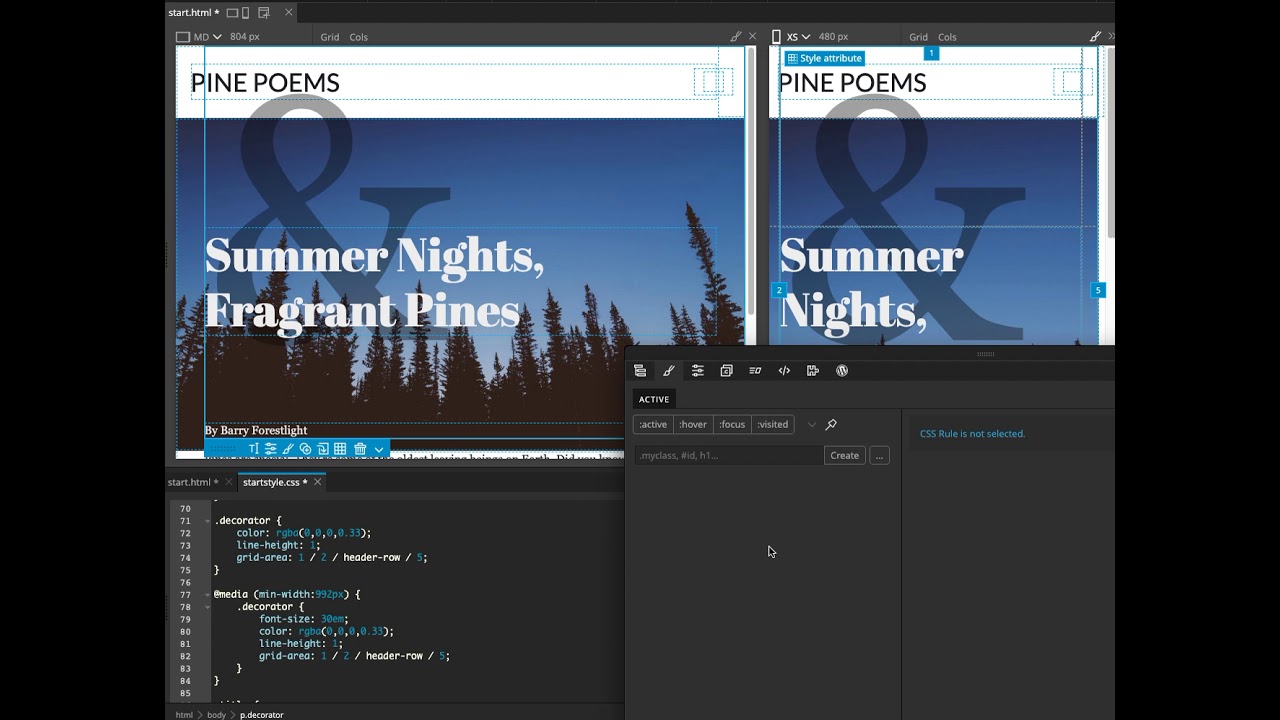 ](https://www.youtube.com/watch?v=CnJLkhuDBRY)
Ctrl +Z undoes in the Active Styles panel (where something was deleted) and restores it there,
but FAILS to restore it in the actual css sheet Im editing.
I thought this had been fixed.
ITs done it in some other places I cant find too, so this tutorial is taking quite a while, as things arent working and i now have missing code in style sheet.
OK enough attempts at finishing this tonight,
have another bug report, or the same bug report from before, or… a distant, near , relative to that bug.
NB, in fact Im not even sure what happens when I enter the mouse in the style code editor page and click it.
The large ampersand reappears after hitting Ctrl + Z and it is restored in design view and active styles panel,
but… then dissapears when I click the actual styles code view, where I want to past it back in,
then reappears when I paste it.
Not sure why it dissapears when I click the code editor view of the stylesheet.
Ive checked the other info on this too (quite a lot about this bug)
Ie,
> [@Undo (command-Z) is Unusable (PG 5.96)](https://forum.pinegrow.com/t/undo-command-z-is-unusable-pg-5-96/4185/7):
>
> Not that it helps with the existing frustrations, but @matjaz spoke a bit regarding “undo / history / cmd-z” and the changes that took place in v5.97 in this other thread. The following is also from the [Release Notes for 5.9.7](https://docs.pinegrow.com/release_notes/pinegrow-web-editor-5-97-july-8-2020/): Combined Undo history Until now it was possible to use separate undo histories for each page and CSS styling by enabling it in Undo options. We removed this option, so that now only, the default, combined history can be used. This lets us remove some complexities …
I totally forgot about that _split history undo_ thing in 5.97 update.I was looking for the option somewhere.
That is a pain.
SO if you’re following a PG tutorial… using pinegrow… and make a mistake.
You’re goosed. ☹
MMMm, so what is the current best way forward?
I’ll try that then, but I actually like the PG editor etc and the way it works and seperate element code view, full page and stylesheet.
its really good!
But man!
this bug… its a killer.
Ok, checking out the _Combined History_ icon… id forgotton about that altogether.
Thats a bit tricky to work out too, but not too bad I think.
but what does it actually DO?
I see orange for css edits
And blue for HTML edits, so I guess I just click backwards until things seem ok, before I got my pudgy fingers on the wrong keys 🙂
Ok, Ctrl +z is damned convenient but this has improved.
I remember using this and once you went back (possibly too far back, to the wrong place) and then clicked one of those edits… you immediately lost all the following undo history… which…was
not…nice…
If you’d gone back too far.
lets go clicky!
ah, this might be ok, lets try and start using this then.
Ill check for some docs on this combined history, undo tool thing tmrw