Interactions world is vast, and I have no idea about what you are trying to achieve with the pinning SO I have quickly tested with the last version of Pinegrow (7.7 released today) and with a very standard pinning action (an element from my document stay pinned for some time while I scroll down/up)
-
A quick reminder by reading the documentation (yes, I’m far from being an Interactions specialist and yes, the documentation is not super exhaustive about this feature)
-
So because it’s easy with Pinegrow, I want to check how the example from the documentation is done. It’s simple, I open the documentation URL >
Scroll Scene | Pinegrow Web Editor from Pinegrow (Open URL from the dashboard) and I check the tree structure and the Interaction settings.
It’s more complex than what I want to try but it is useful to understand the process

So far, it works in Pinegrow.
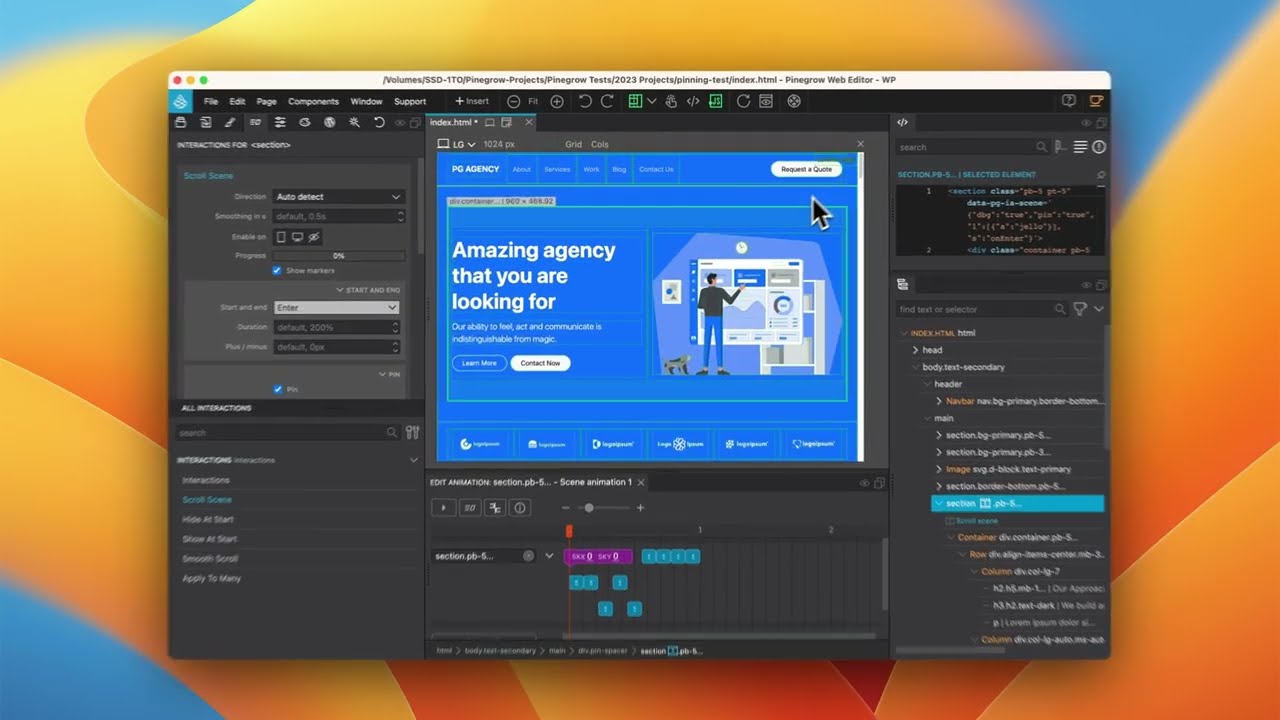
- Last step, with my simple understanding of the Pinning, I start a new project (using a Bootstrap template available in Pinegrow) and I try my very basic pinning action.
- I set the scroll scene on the section
- No specific settings, everything set to default
- I pin the section and while the document scroll up/down, when the section is pinned, I add a Jello effect on the element.
Note: You can download the project here
It seems ok as well.
Feedback welcome.